Opening a Binance account so your idle coins can earn

Idle coins can't earn anything until they sit in an account. The whole account-opening flow is "register → enter the invite code → complete identity verification → do the security settings → deposit or buy coins → subscribe to an earn product," and what actually trips people up is rarely the registration steps — it's ID photos getting rejected, and the security settings people can't be bothered to do once the account is open. Our Binance invite code is BNB2628 and the OKX one is OK2628; type it into the invite-code field yourself when you register.
Why an account is step one if you want coins to earn
Every yield product this site covers — flexible savings, fixed terms, staking, Dual Investment, Launchpool — needs an account before you can touch it. Not because exchanges are wonderful, but because one interface bundles four jobs together: custody, converting, subscribing and redeeming. You don't manage private keys, don't pay gas, don't have to tell a real contract address from a fake one. For someone earning yield on crypto for the first time, that layer of convenience matters.
You can of course earn on-chain instead, and there are even more routes there. The difference is that the barrier and the cost of a mistake aren't in the same league:
| Comparison | Exchange account | On-chain wallet / DeFi |
|---|---|---|
| Who holds your coins | The exchange | You (private key, seed phrase) |
| Barrier to entry | Register + verify identity | Create a wallet, buy gas, vet contracts |
| Cost of a slip | Support can usually chase it | A wrong address is basically gone |
| Main risk | Platform credit risk | Lost keys + smart contract risk |
| Getting money in | Fiat on-ramp or a coin deposit | You need coins from somewhere else first |
So for most people step one lands on an exchange — it pushes the cost of "I want to start" as low as it goes. Once you have more money in play and you're comfortable with on-chain tools, you can move a slice out there; that's a later chapter. For where each of the five yield types gets its yield from and which carries more risk, see Crypto earn basics: 5 yield product types and the risk spectrum.
There's a practical reason too: the account is a one-off cost. Registering and verifying takes effort exactly once, and after that subscribing, redeeming and switching products never repeat it. So even if you only plan to test the water with a couple of hundred USDT, it's worth doing this step properly — especially the security settings further down.
Before you start, have five things ready. You don't need much, but missing any one of them means stopping halfway through, which is more annoying than preparing.
- An email address you'll keep receiving mail at long-term. Not a work address, and not a disposable one. Every security notice, unusual-login alert and balance-change notification goes there, and changing jobs or letting the address lapse leaves you stuck. If you can, open one used only for exchanges — it's the calmest option.
- A phone number you actually use. It's for SMS verification and some security operations. Don't use a number you're about to cancel.
- A strong, dedicated password. The key word is dedicated — don't reuse the one from your email or social accounts. When accounts like this get taken over, it's often not the exchange being breached but a password leaked elsewhere being replayed against you. Generate a random one in a password manager; not being able to remember it yourself is the safer outcome.
- An unexpired original ID document. A national ID card or passport — you'll photograph it at the verification step. Check the expiry date first; that's the number-one reason for rejection.
- A phone with an authenticator app installed. Google Authenticator or similar is fine. You'll use it to bind two-factor authentication as soon as the account is open, so installing it now saves a round trip.
One more thing that isn't preparation but is worth settling first: how much you intend to put in. That number shapes whether you choose flexible or fixed later, and whether to split across two platforms. If you can't decide, start with an amount you could lose without it affecting your life, run the flow once, and add later.
Where the invite code field is on Binance's sign-up page
Registration itself is short — usually a few minutes end to end. The order goes roughly like this:
- Open the official sign-up page. You can register in the mobile app or on the web; the interfaces differ slightly, the flow is the same. Binance's official sign-up page is this site's entry point carrying invite code BNB2628.
- Pick how you register: email or phone number both work, and Binance also offers sign-up with an Apple or Google account or Telegram. If you use email or phone, you can add the other one later in the security settings, giving you an extra recovery route.
- Set a password. Use the dedicated one you prepared earlier.
- Find the "invite code / referral code" field. It's sometimes collapsed by default, and you need to tap a small "enter invite code" line to expand it. If you came through the coded link above, the field will usually be pre-filled with BNB2628 — just check it; if you're registering manually, type it in yourself.
- Get the verification code. A string of digits arrives by email or SMS; enter it to complete verification.
- Land on the account dashboard. At this point the account exists, but you still can't do much — identity verification is the next gate.
Disclosure: the link above is this site's promotional link. If you register through it, the price you pay is not increased as a result. This site is an independently run information site, not Binance's official website. The benefit is a fee discount of up to 20%; whether it applies and what the actual rate is follow Binance's current rules and what your account page shows.
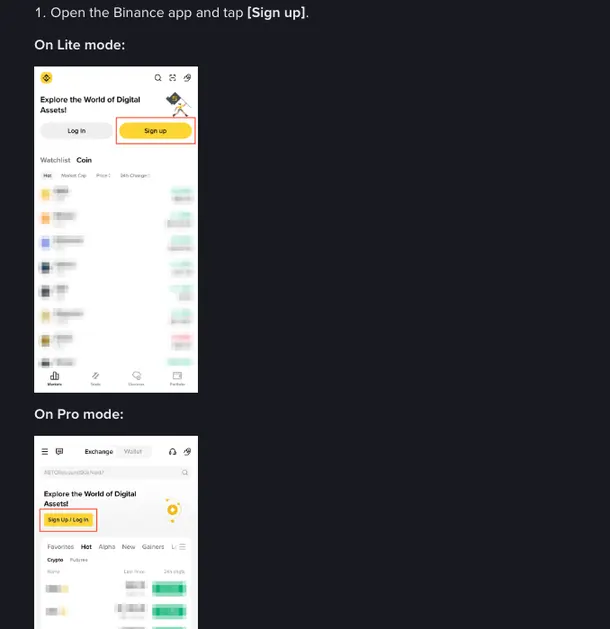
One point about the invite code deserves its own paragraph: it isn't a required field, but sign-up is the easiest time to enter it. Leave it blank and the account still gets created. A new Binance account that missed it gets one more chance: within 30 days of registering, with no deposits or trades yet, no existing referral relationship, and identity details not used for another account in the past 180 days, among other conditions, it can bind a code from the Referral page. After that window it can't be added; a referral relationship already in place can't be changed or removed, and closing an account to re-register with a different code may cost you the rewards. So fill it in even if you haven't made up your mind: miss it and you only have 30 days, plus a few conditions to meet, to add it later.
📋 Where the invite-code field tends to hide
This field sits in slightly different places across versions of the sign-up page: on the web it's usually a line of small grey text under the password box that expands into an input when you tap it; in the app it's sometimes tucked under "more options." What they have in common is that it isn't prominent by default — presumably because it's optional to begin with. If you've already come in through the coded link, scan down the page and check whether the invite-code field already reads BNB2628; if it does, leave it alone.
Identity verification: shooting an ID that won't be rejected
Identity verification (what people call KYC) is the step most likely to stall the whole account-opening flow — usually because the document photo or the selfie gets rejected and has to be retaken and uploaded again.
First, why you can't skip it. A newly registered Binance account can't deposit or trade until identity verification is done — so no earn products either. Until then, all you can do is look around the interface and browse product lists. Once you're verified, the Identity Verification page shows how much each tier can deposit and withdraw.
Verification generally involves two things: uploading photos of your document and taking a liveness selfie. The first is photographing the front and back clearly; the second lets the camera confirm the person photographing is you, usually by asking you to turn your head, blink or read out a string of digits.
For the photos, follow these and you'll usually pass first time:
- The document must be within its validity period. Expired ones are simply not accepted — the most common cause of failure.
- All four corners must be in frame. A tilted shot, a clipped corner or an edge running off the frame can all be judged incomplete.
- No glare, no blur. Turn off the flash, find somewhere with even light (natural light by a window works best), and zoom in on the result yourself to check that the document number and name are perfectly legible.
- Don't let a finger sit on the information. Plenty of people hold the document steady and cover the document number with a thumb.
- Shoot the original — not a photocopy, and not a screen. The system is very sensitive to screen moiré and black-and-white photocopies.
- What you type must match the document character for character. Name, date of birth, document number — one character off and it comes back. Watch spaces in names and unusual character forms.
The liveness selfie works the same way: enough light, glasses, mask and hat off, follow the prompted movements, and don't switch away to take a call mid-flow. Then you wait for review. Binance's Help Center says results usually come within 48 hours, a little longer when the queue is busy; the status on your account page is what counts.
Don't panic if it's rejected. The system generally gives a rough reason for the failure; fix that and reupload. The number of retries is usually enough. If several attempts genuinely fail, go through official support channels — don't go searching for those "verification-for-hire" services. Handing your ID documents to a stranger is far worse than failing verification.
Just parking coins to earn? Why 2FA and a whitelist matter more
Coins in an earn product often sit for months without anyone checking the account. These three settings keep watch in the meantime:
1. Two-factor authentication (2FA)
Bind an authenticator app in the security settings. It generates a fresh string of digits every 30 seconds, required both to log in and to withdraw, so someone holding only your password can't get in. It's worth binding before SMS codes — SMS carries hijacking and SIM-swap risk.
During binding you'll be given a backup key or a set of recovery codes. Write that down — on paper — and keep it somewhere you'll find it. Lose the phone, reinstall the system, wipe the app's data, and that string is your only lifeline. Don't just screenshot it onto the same phone: when the phone goes, so does the screenshot.
2. Anti-phishing code
This one is badly underrated. You set a short string only you know, and from then on every official email the exchange sends you carries it. An email without that string is fake, no matter how official it looks.
Phishing emails are one of the main entry points for accounts like this getting drained, and the subject lines tend to be the panic-inducing kind: "unusual login, verify immediately," "your account is about to be frozen." Once the anti-phishing code is set, an email without that string can be treated as fake straight away; one that has it still deserves a look at the sender address and the links. When in doubt, don't click anything in the email: open the official app or website yourself and see whether the issue is real, or check the link or address with Binance Verify.
3. Withdrawal address whitelist
In withdrawal address management, turn on the whitelist (some interfaces call it address book restriction), add your own wallet addresses, and then allow withdrawals only to whitelisted addresses. That way, even if someone gets into the account, coins can only leave to your own addresses.
While you're there, look out for any "withdrawal without verification" convenience option — that kind of switch, which skips two-factor to save a step, is pure risk for an account you rarely log into, so turn it off. Adding a whitelist address usually carries a delay before it takes effect; that delay isn't an inconvenience, it's a protection that buys you reaction time.
Beyond those three, two more are easy to do while you're in there: first, check the logged-in device list under device management and kick out anything you don't recognize; second, don't enable the API if you don't use it — and if you created a key to run some tool, restrict it by IP and don't grant withdrawal permission.
A note for people earning over the long term
Putting coins into an earn product is not the same as locking them in a safe. Assets sitting in earn can just as easily be redeemed and moved out if someone gains control of the account. The security settings are what guard against exactly that layer, and their value shows precisely during the months you're not looking at the account. So don't wait until there's more money in there to go back and fix this — by then something has usually already happened.
Flexible or fixed for your first coins
Verification is through and the security settings are done, so next comes getting coins into the account and subscribing to a product.
There are two common routes to getting coins: buying directly with fiat (buying a stablecoin such as USDT through the exchange's fiat or P2P entry; first check whether C2C / P2P is available where you live), or depositing coins from somewhere else. One suggestion for your first time: send a very small amount first to prove the route works, confirm it arrived, and only then send the larger amount. Choosing the right chain matters especially on cross-chain deposits — recovering coins sent on the wrong chain is a lot of trouble, and the cost of that small test transfer is far below the cost of getting it wrong.
Once the coins land, you can move into earn products. Pick by your situation:
- No idea where to start and just want to run the flow → begin with Your first deposit: how to start with 100 USDT and walk the whole chain with a small amount.
- Want the specifics of flexible and fixed terms → read Binance Simple Earn: how to use flexible and fixed-term savings, which covers the entry path, subscribing, interest accrual and redemption.
- Torn over which tier this money belongs in → read Flexible vs fixed vs staking: where to put it, which measures all three against liquidity, APY and risk.
- Wondering when the money actually starts earning → read How interest is calculated and when it arrives, which answers the "why do earnings show 0 today" question.
A word on OKX as well. This site's OKX invite code is OK2628, and the sign-up flow is much like the one above — the same four steps of register, enter the code, verify identity and do the security settings, just with different names in the interface. Its yield products sit in the "Earn" channel, which holds Simple Earn, on-chain Earn and Dual Investment side by side even though they're very different in nature, so before you touch them it's worth reading OKX Earn: flexible, fixed and on-chain Earn to tell the three apart. As for which of the two to pick, or whether to open both, Binance vs OKX: which Earn fits you better compares them item by item. One account is entirely enough to start with — get fluent with one before adding another.
Three risks to state up front
You're opening the account in order to earn, so the boundaries of earning itself need spelling out before you put money in.
First, exchange earn products are not bank deposits and are not principal-protected. Putting coins into flexible savings or a fixed term is, at its core, lending them out for a slice of interest while carrying the platform's credit risk. There's no deposit insurance here, and if the platform really runs into trouble, your money may not come back intact. We pull those details apart in more depth in Is exchange Earn safe? Will you lose money, what if the platform blows up — worth finishing before you deposit.
Second, the flexible APY floats and the platform adjusts it whenever. The number you see today is a reference value computed from current supply and demand in the lending pool, not a promise to you. When the market is hot, borrowing demand runs high and the rate spikes; when things go quiet it falls back. So don't take a screenshot from one moment and extrapolate a year's earnings — that arithmetic doesn't hold from the start. On how to read these rate figures, What's the difference between APY and APR covers part of it.
Third, fixed terms have a lock-up and leaving early has a cost. Money locked in can't be taken out during the term, or can be exited early at the price of giving up the interest for that period. Before subscribing, think through whether you'll need this money during the lock-up — don't box yourself in for an extra point or two of APY. And for products showing absurdly high rates, on any platform, ask first: where is this yield supposed to come from? Why high APYs deserve the most caution is about exactly that question.
Risk note
None of the earn products inside an exchange account are principal-protected. Flexible savings and fixed terms are, at their core, lending your coins out and taking on the platform's credit risk; the estimated APY floats at any time and doesn't represent the return you'll finally pocket. In extreme market conditions or platform incidents, you can lose part or even all of your principal. Crypto assets are themselves highly volatile: even if interest keeps being paid, a falling coin price still shrinks the fiat value of your holdings. This piece is compiled information for reference, not investment advice — only use money you can afford to lose.
FAQ
Do you have to enter an invite code to register with Binance?
It isn't mandatory — you can leave it blank and still register successfully. The difference is that an invite code is usually tied to promotional benefits such as a fee discount, and it is easiest to enter at sign-up; a new Binance account that missed it can still bind one from the Referral page within 30 days if it has no deposits or trades yet, no existing referral link and meets the other conditions, and after that window it can't be added. Our Binance invite code is BNB2628 and the OKX one is OK2628; just type it into the invite-code field on the sign-up page. The benefit is a fee discount of up to 20%; whether it applies and what the actual rate is follow the exchange's current rules and what your account page shows.
Can you use earn products without identity verification?
No. A newly registered Binance account can't deposit or trade until identity verification is done — so no earn products either. Before that, you can only look around the interface.
Why does identity verification usually get rejected?
Most of the time it's the photo itself: the document has expired, all four corners aren't in frame, there's glare or the focus is soft, a finger is covering key information, or you photographed a photocopy or a screen. After that it's the name, date of birth or document number you typed not matching the document, or a liveness selfie taken in poor light or with glasses and a mask on. Reshooting as prompted usually gets you through.
If the coins are just sitting there earning, can you skip the security settings?
Quite the opposite — an account you rarely log into is exactly the one that needs the settings done fully. Two-factor authentication, an anti-phishing code and a withdrawal address whitelist together take very little time, and their whole point is to stand guard during the months you don't check the account. Assets sitting in earn products aren't sealed off either: once an account is compromised, they can be redeemed and moved out just the same.
Is one account, Binance or OKX, enough?
One is plenty to start with — getting fluent with a single platform's flow is more practical than running two at once. Once you have more money deposited, or you want to compare the two sides' products and rates directly, open a second one to spread platform risk. Our Binance invite code is BNB2628 and the OKX one is OK2628; there's a separate comparison piece on the site covering how the two product lines differ.
How soon after registering can you start earning interest?
Once the account is usable, the remaining time goes into depositing or buying coins. After the coins arrive and the subscription to an earn product succeeds, interest typically starts accruing the next day, so seeing 0 earnings on the day is normal. For the exact start time and payout cadence, follow the description on the product page you subscribed to.
Invite code information
Type the invite code into the invite-code field on the exchange's own sign-up page — entering it at sign-up is easiest; new Binance accounts that missed it can bind within 30 days if eligible, while OKX doesn't allow adding it after registration. The benefit is a fee discount of up to 20%; whether it applies and what the actual rate is follow each exchange's current rules and what your account page shows. This site is independently run and is not an exchange's official website.